728x90
SMALL
import UIKit
import MapKit

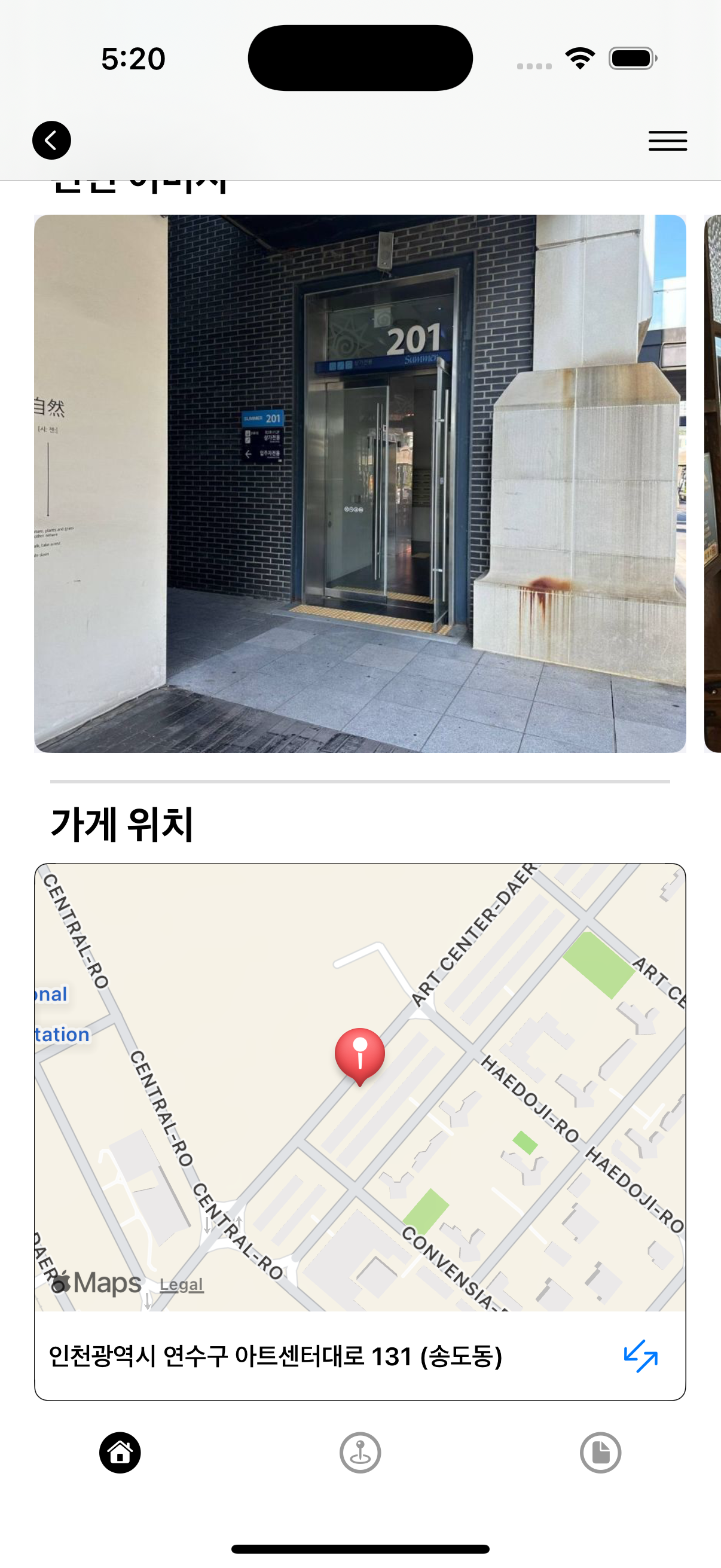
class DetailMapInfoCell: UICollectionViewCell {

    static let reuseIdentifier: String = "DetailMapInfoCell"

    // MARK: - UI Components
    private let containerView: UIView = UIView()
    private let mapView: MKMapView = MKMapView()
    private let addressLabel: UILabel = UILabel()
    private let mapExpandButton: UIButton = UIButton()

    override init(frame: CGRect) {
        super.init(frame: frame)
        contentView.backgroundColor = .systemBackground
        setupUI()
    }

    required init?(coder: NSCoder) {
        fatalError("init(coder:) has not been implemented")
    }

    private func setupUI() {
        // containerView 설정
        containerView.layer.borderWidth = 0.5
        containerView.layer.borderColor = UIColor.black.cgColor
        containerView.layer.cornerRadius = 8
        containerView.clipsToBounds = true

        // ✅ 지도 인터랙션 허용
        mapView.isUserInteractionEnabled = true

        // 주소 라벨 설정
        addressLabel.font = .systemFont(ofSize: 14, weight: .semibold)
        addressLabel.textAlignment = .left
        addressLabel.textColor = .label
        addressLabel.numberOfLines = 1

        // 버튼 설정
        let iconImage = UIImage(named: "map_expand_icon") // 네가 첨부한 이미지 이름으로 추가 (Assets에 넣어야 함)
        mapExpandButton.setImage(iconImage, for: .normal)
        mapExpandButton.addTarget(self, action: #selector(didTapExpandButton), for: .touchUpInside)

        // 뷰 계층 구성
        contentView.addSubview(containerView)
        containerView.addSubview(mapView)
        containerView.addSubview(addressLabel)
        containerView.addSubview(mapExpandButton)

        // 오토레이아웃
        containerView.translatesAutoresizingMaskIntoConstraints = false
        mapView.translatesAutoresizingMaskIntoConstraints = false
        addressLabel.translatesAutoresizingMaskIntoConstraints = false
        mapExpandButton.translatesAutoresizingMaskIntoConstraints = false

        NSLayoutConstraint.activate([
            containerView.leadingAnchor.constraint(equalTo: contentView.leadingAnchor),
            containerView.trailingAnchor.constraint(equalTo: contentView.trailingAnchor),
            containerView.topAnchor.constraint(equalTo: contentView.topAnchor),
            containerView.bottomAnchor.constraint(equalTo: contentView.bottomAnchor),

            mapView.leadingAnchor.constraint(equalTo: containerView.leadingAnchor),
            mapView.trailingAnchor.constraint(equalTo: containerView.trailingAnchor),
            mapView.topAnchor.constraint(equalTo: containerView.topAnchor),
            mapView.heightAnchor.constraint(equalToConstant: 250),

            addressLabel.leadingAnchor.constraint(equalTo: containerView.leadingAnchor, constant: 8),
            addressLabel.trailingAnchor.constraint(equalTo: containerView.trailingAnchor, constant: -8),
            addressLabel.topAnchor.constraint(equalTo: mapView.bottomAnchor, constant: 8),
            addressLabel.bottomAnchor.constraint(equalTo: containerView.bottomAnchor, constant: -8),

            // ✅ 버튼은 지도 우측 하단에 위치
            mapExpandButton.trailingAnchor.constraint(equalTo: mapView.trailingAnchor, constant: -8),
            mapExpandButton.bottomAnchor.constraint(equalTo: mapView.bottomAnchor, constant: -8),
            mapExpandButton.widthAnchor.constraint(equalToConstant: 30),
            mapExpandButton.heightAnchor.constraint(equalToConstant: 30)
        ])
    }

    func configure(with item: Mapinfo) {
        addressLabel.text = item.address

        guard let lat = Double(item.mapY),
              let lon = Double(item.mapX)
        else { return }

        let coordinate = CLLocationCoordinate2D(latitude: lat, longitude: lon)
        let region = MKCoordinateRegion(
            center: coordinate,
            span: MKCoordinateSpan(latitudeDelta: 0.005, longitudeDelta: 0.005)
        )

        mapView.setRegion(region, animated: false)
        mapView.removeAnnotations(mapView.annotations) // 중복 방지
        let annotation = MKPointAnnotation()
        annotation.coordinate = coordinate
        mapView.addAnnotation(annotation)
    }

    // MARK: - Action
    @objc private func didTapExpandButton() {
        print("지도페이지로 이동")
    }
}
728x90
LIST
'Project > HiddenGem' 카테고리의 다른 글
| 🔨 Raw value for enum case must be a literal 문제 해결! (0) | 2025.06.03 |
|---|---|
| 🤔 뷰 컨트롤러가 모달로 띄워졌는지 어떻게 알 수 있나? (0) | 2025.06.02 |
| 🔨 데이터 타입 변환 및 통합하기 (0) | 2025.05.29 |
| ✅ UICollectionViewCell을 공용으로 사용하려면? (데이터 타입도 다를때) (0) | 2025.05.27 |
| 🤷 컬렉션뷰에 페이징 기능 추가 (스크롤하면 새 데이터 불러와 컬렉션뷰로 보여주기) (0) | 2025.05.22 |


