https://explorer89.tistory.com/573
🔥 Firebase Functions 시작하다가 npm 에러와 경고를 만났을 때 정리
Firebase Cloud Functions를 사용하기 위해Firebase CLI를 설치하려고 아래 명령어를 실행했다.npm install -g firebase-tools 하지만 처음에는 다음과 같은 에러를 만났다.command not found: npm 이 글은👉 왜 이런 에
explorer89.tistory.com
⚠️ 데스크탑에 프로젝트가 있는 폴더로 이동한 다음, "Firebase init" 명령어를 입력했는데, 아래와 같은 오류가 발생했다.
kwonjeong-geun@gwonjeong-geuns-MacBook-Air PulseBoard % firebase init Error:
Failed to authenticate, have you run firebase login?
결론부터 딱 정리
❌ Firebase 콘솔(웹)에 로그인된 상태 ≠ Firebase CLI 로그인
✅ 터미널에서 firebase login을 따로 해줘야 한다
지금 에러는 이거 하나 때문에 난 거야 👇
Error: Failed to authenticate, have you run firebase login?
왜 이런 일이 생기냐면
Firebase에는 로그인 주체가 2개가 있어.
1️⃣ Firebase 콘솔 로그인 (웹)
- 브라우저에서 firebase.google.com 접속
- 프로젝트 관리
- 설정, 대시보드 확인
👉 이건 웹 UI용 로그인
2️⃣ Firebase CLI 로그인 (터미널) ← 지금 필요한 것
- firebase init
- firebase deploy
- firebase emulators
👉 이건 터미널 도구용 로그인
📌 서로 완전히 별개야.
“어디에 로그인을 하라는 거야?”의 정답
👉 터미널에서 이 명령어를 실행하라는 뜻
firebase login
지금 바로 해야 할 순서
1️⃣ 프로젝트 디렉토리 그대로 유지한 상태에서
firebase login
2️⃣ 무슨 일이 일어나냐면
- 기본 브라우저 자동으로 열림
- Google 계정 선택 화면 나옴
- Firebase 프로젝트에 연결된 같은 계정으로 로그인
- “Firebase CLI에 권한 부여” 승인
3️⃣ 성공하면 터미널에 이런 메시지
✔ Success! Logged in as your-email@gmail.com
한 번에 정리
Firebase 콘솔에 로그인되어 있어도
Firebase CLI는 별도의 인증이 필요하다.
firebase init 실행 전에는 반드시
터미널에서 firebase login을 먼저 실행해야 한다.
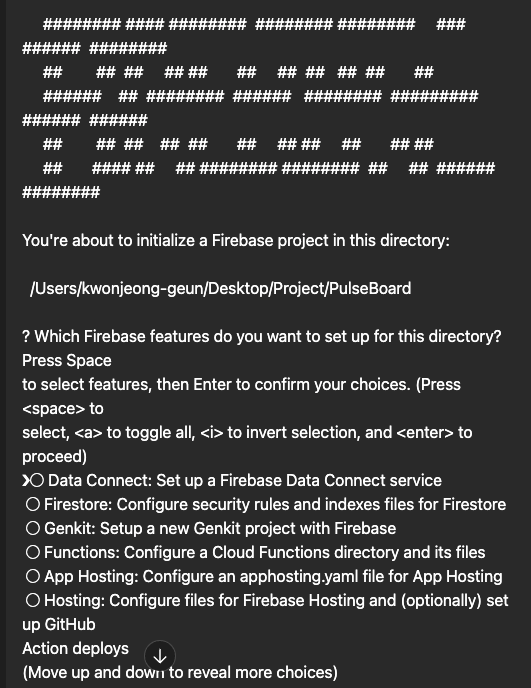
결론부터 딱 말하면
👉 Functions만 선택하면 된다.
우리는 지금 목표가 딱 하나잖아 👇
카카오 로그인으로 받은 토큰을
Firebase Custom Token으로 바꿔주는 서버 만들기
👉 이건 Cloud Functions의 역할이야.
이 화면에서 무엇을 선택해야 하나?
지금 보이는 선택지 다시 보면 👇
◯ Data Connect
◯ Firestore
◯ Genkit
◯ Functions   ← ✅ 이거
◯ App Hosting
◯ Hosting
선택 방법 (중요 ⭐️)
이 화면에서는 마우스 안 씀 👇
1️⃣ 방향키 ↓ ↑ 로 Functions에 커서 이동
2️⃣ 스페이스바(space) 눌러서 체크
- ◯ → ◉ 로 바뀜
3️⃣ Enter ⏎
👉 이렇게 하면 된다.
왜 Functions만 선택하냐면
우리가 지금 하려는 것의 정체
- Firebase Auth에서 Custom Token 생성
- 이건 반드시 Firebase Admin SDK 필요
- Admin SDK는 서버(Cloud Functions) 에서만 사용 가능
👉 Firestore, Hosting은 이 단계에서 필요 없음

결론부터 딱 정리
👉 Use an existing project 를 선택하면 된다.
이유는 간단해 👇
- 이미 Firebase 콘솔에서 PulseBoard 프로젝트를 만들어 둠
- 지금 이 로컬 디렉토리(PulseBoard)를
👉 그 Firebase 프로젝트와 연결하려는 단계
지금 단계에서 정확한 흐름
PulseBoard (로컬 폴더)
   ↓
firebase init
   ↓
Use an existing project
   ↓
Firebase 콘솔의 PulseBoard 프로젝트 선택
     ######## #### ########  ######## ########     ###     ######  ########
     ##        ##  ##     ## ##       ##     ##  ##   ##  ##       ##
     ######    ##  ########  ######   ########  #########  ######  ######
     ##        ##  ##    ##  ##       ##     ## ##     ##       ## ##
     ##       #### ##     ## ######## ########  ##     ##  ######  ########

You're about to initialize a Firebase project in this directory:

  /Users/kwonjeong-geun/Desktop/Project/PulseBoard

? Which Firebase features do you want to set up for this directory? Press Space
to select features, then Enter to confirm your choices. Functions: Configure a
Cloud Functions directory and its files

=== Project Setup

First, let's associate this project directory with a Firebase project.
You can create multiple project aliases by running firebase use --add,
but for now we'll just set up a default project.

? Please select an option: Use an existing project
? Select a default Firebase project for this directory: pulseboard-32280
(PulseBoard)
i  Using project pulseboard-32280 (PulseBoard)

=== Functions Setup

Let's create a new codebase for your functions.
A directory corresponding to the codebase will be created in your project
with sample code pre-configured.

See https://firebase.google.com/docs/functions/organize-functions for
more information on organizing your functions using codebases.

Functions can be deployed with firebase deploy.

? What language would you like to use to write Cloud Functions? JavaScript
? Do you want to use ESLint to catch probable bugs and enforce style? No
✔  Wrote functions/package.json
✔  Wrote functions/index.js
✔  Wrote functions/.gitignore
? Do you want to install dependencies with npm now? Yes
npm warn EBADENGINE Unsupported engine {
npm warn EBADENGINE   package: undefined,
npm warn EBADENGINE   required: { node: '22' },
npm warn EBADENGINE   current: { node: 'v18.20.8', npm: '10.8.2' }
npm warn EBADENGINE }
npm warn deprecated inflight@1.0.6: This module is not supported, and leaks memory. Do not use it. Check out lru-cache if you want a good and tested way to coalesce async requests by a key value, which is much more comprehensive and powerful.
npm warn deprecated glob@7.2.3: Glob versions prior to v9 are no longer supported

added 519 packages, and audited 520 packages in 15s

68 packages are looking for funding
  run `npm fund` for details

found 0 vulnerabilities

i  Writing configuration info to firebase.json...
i  Writing project information to .firebaserc...
i  Writing gitignore file to .gitignore...
✅ 지금 상태 정리 (무엇이 끝났나?)
✔ Firebase Functions 초기화 완료
로그 마지막에 이 문장이 핵심이야 👇
✔ Firebase initialization complete!
그리고 실제로 프로젝트에는 이런 것들이 생겼어:
PulseBoard/
 ├─ functions/
 │   ├─ index.js
 │   ├─ package.json
 │   └─ node_modules/
 ├─ firebase.json
 ├─ .firebaserc
 └─ .gitignore
👉 이 의미는:
- Firebase 프로젝트 ↔ 로컬 디렉토리 연결 완료
- Cloud Functions 코드를 작성할 “서버 자리” 마련 완료
즉, ‘환경 세팅’ 단계는 끝났다.
❗ 중요한 포인트: “아직 끝난 게 아닌 이유”
❌ 지금 상태 = 카카오 액세스 토큰을 커스텀 토큰으로 바꿀 수 있음
⭕ 지금 상태 = 그걸 할 ‘빈 서버’만 있음
아직 아래 3가지가 안 되어 있음 👇
🔥 이제부터가 진짜 구현 단계 (중요)
STEP 1️⃣ Functions 코드 구현 (가장 먼저)
functions/index.js 안에는 지금 샘플 코드만 있어.
여기서 우리가 만들어야 할 것:
POST /kakaoCustomToken
이 함수가 할 일 👇
- iOS에서 Kakao accessToken(또는 ID Token) 받기
- Kakao API로 토큰 검증
- kakao userId 추출
- uid = kakao:{userId}
- Firebase Admin SDK로 Custom Token 생성
- customToken 반환
📌 **이 단계가 끝나기 전에는 Xcode에서 할 게 없다.**

---

### STEP 2️⃣ Cloud Functions 배포

코드 작성 후에야 이걸 실행함 👇

```bash
firebase deploy --only functions
👉 이때 실제 HTTPS 엔드포인트 URL이 생김
STEP 3️⃣ Xcode에서 Functions 호출
그 다음에야 비로소 iOS에서:
- Kakao 로그인
- accessToken 획득
- Cloud Functions API 호출
- customToken 받기
- Auth.auth().signIn(withCustomToken:)
👉 지금 단계에서는 아직 이걸 하면 안 됨
정확한 순서는 👇
1️⃣ Firebase Functions 환경 설정  ✅ (지금 완료)
2️⃣ Functions 서버 코드 구현      ⬅️ 지금 여기
3️⃣ Functions 배포
4️⃣ Xcode에서 Functions 호출'PulseBoard' 카테고리의 다른 글
| Firebase Authentication의 OpenID Connect를 쓰지 않고Cloud Functions + Custom Token으로 Kakao 로그인을 구현한 이유 (1) | 2025.12.25 |
|---|---|
| Firebase - Functions 의 Index.js 역할 (0) | 2025.12.24 |
| 🔥 Firebase Functions 시작하다가 npm 에러와 경고를 만났을 때 정리 (0) | 2025.12.24 |
| 카카오 OpenID Connect를 써도 Firebase Custom Token이 필요한 이유 (0) | 2025.12.24 |
| 🔐 카카오 로그인은 왜 Firebase Email/Password로 쓰면 안 될까? (0) | 2025.12.24 |