✅ 다음 단계 체크리스트
1️⃣ axios 설치 (반드시 functions 디렉토리에서)
Firebase Cloud Functions는 프로젝트 루트가 아니라 functions/ 폴더가 하나의 Node.js 프로젝트야.
👉 그래서 axios도 functions 폴더에 설치해야 한다.
cd functions
npm install axios
설치가 끝나면:
- functions/package.json에 axios가 추가되고
- functions/node_modules/axios가 생긴다
📌 루트(PulseBoard)에서 설치하면 안 된다
→ Functions 배포 시 axios를 못 찾는 에러 발생함
2️⃣ 설치 확인 (중요)
cat package.json
dependencies 안에 아래가 있으면 OK:
"dependencies": {
  "axios": "^1.x.x",
  "firebase-admin": "...",
  "firebase-functions": "..."
}
3️⃣ (선택) 로컬 에뮬레이터 테스트
아직 배포 전에 테스트하고 싶다면:
firebase emulators:start --only functions
그리고 curl 테스트 예시:
curl -X POST http://localhost:5001/프로젝트ID/us-central1/kakaoCustomToken \
  -H "Content-Type: application/json" \
  -d '{"kakaoAccessToken":"테스트용_토큰"}'
4️⃣ 실제 배포
문제 없으면 배포:
firebase deploy --only functions
❓ “axios 말고 다른 것도 설치해야 하나?”
지금 단계에서는 ❌ 없다
이미:
- firebase-admin
- firebase-functions
는 firebase init 할 때 자동으로 설치되어 있음.
👉 지금 추가 설치는 axios 하나면 충분
kwonjeong-geun@gwonjeong-geuns-MacBook-Air functions % npm install axios
npm warn EBADENGINE Unsupported engine {
npm warn EBADENGINE   package: undefined,
npm warn EBADENGINE   required: { node: '22' },
npm warn EBADENGINE   current: { node: 'v18.20.8', npm: '10.8.2' }
npm warn EBADENGINE }

added 5 packages, and audited 525 packages in 991ms

69 packages are looking for funding
  run `npm fund` for details

found 0 vulnerabilities
kwonjeong-geun@gwonjeong-geuns-MacBook-Air functions % cat package.json
{
  "name": "functions",
  "description": "Cloud Functions for Firebase",
  "scripts": {
    "serve": "firebase emulators:start --only functions",
    "shell": "firebase functions:shell",
    "start": "npm run shell",
    "deploy": "firebase deploy --only functions",
    "logs": "firebase functions:log"
  },
  "engines": {
    "node": "22"
  },
  "main": "index.js",
  "dependencies": {
    "axios": "^1.13.2",
    "firebase-admin": "^12.6.0",
    "firebase-functions": "^6.0.1"
  },
  "devDependencies": {
    "firebase-functions-test": "^3.1.0"
  },
  "private": true
}
✅ 지금 상황 요약 (결론부터)
- axios ✅ 정상 설치됨
- package.json ✅ 의도한 상태로 잘 구성됨
- 경고(EBADENGINE) ⚠️ 치명적 문제 아님
- 다음 단계로 바로 진행 가능
✅ 다음 할 일 순서
- (선택) 로컬 에뮬레이터로 테스트
firebase emulators:start --only functions- Functions 배포
firebase deploy --only functions- 배포 후 URL 확인
https://us-central1-프로젝트ID.cloudfunctions.net/kakaoCustomToken
1️⃣ Functions 배포
터미널 위치가 프로젝트 루트(PulseBoard) 인지만 확인하고, 그대로 실행해.
firebase deploy --only functions❗️프로젝트 ID를 명령어에 직접 넣을 필요는 없어
- firebase init 할 때 이미 .firebaserc에
pulseboard-32280가 연결돼 있음 - 그래서 위 명령어 하나면 해당 프로젝트로 배포됨
배포 중간에:
- 어떤 함수가 배포되는지
- 어느 리전에 배포되는지
콘솔에 출력된다.
2️⃣ 배포 완료 후 URL 확인
배포가 끝나면 터미널에 이런 로그가 반드시 나온다 👇
✔  functions[kakaoCustomToken(us-central1)]: Successful deploy
Function URL (kakaoCustomToken):
https://us-central1-pulseboard-32280.cloudfunctions.net/kakaoCustomToken
👉 이 URL이 정답이다.
kwonjeong-geun@gwonjeong-geuns-MacBook-Air functions % pwd
/Users/kwonjeong-geun/Desktop/Project/PulseBoard/functions
kwonjeong-geun@gwonjeong-geuns-MacBook-Air functions % cd ..
kwonjeong-geun@gwonjeong-geuns-MacBook-Air PulseBoard % ls
APPICON				PulseBoard.xcodeproj
Apple Developer-AuthKey- Apple	PulseBoardTests
Firebase-Info			PulseBoardUITests
LICENSE				README.md
LoginIcon			firebase.json
PulseBoard			functions
kwonjeong-geun@gwonjeong-geuns-MacBook-Air PulseBoard % firebase deploy --only functions


=== Deploying to 'pulseboard-32280'...

i  deploying functions
i  functions: preparing codebase default for deployment
i  functions: ensuring required API cloudfunctions.googleapis.com is enabled...
i  functions: ensuring required API cloudbuild.googleapis.com is enabled...
i  artifactregistry: ensuring required API artifactregistry.googleapis.com is enabled...
✔  functions: required API cloudfunctions.googleapis.com is enabled
⚠  artifactregistry: missing required API artifactregistry.googleapis.com. Enabling now...
⚠  functions: missing required API cloudbuild.googleapis.com. Enabling now...
✔  artifactregistry: required API artifactregistry.googleapis.com is enabled
✔  functions: required API cloudbuild.googleapis.com is enabled
⚠  functions: package.json indicates an outdated version of firebase-functions. Please upgrade using npm install --save firebase-functions@latest in your functions directory.
⚠  functions: Please note that there will be breaking changes when you upgrade.
i  functions: Loading and analyzing source code for codebase default to determine what to deploy
Serving at port 8400

i  extensions: ensuring required API firebaseextensions.googleapis.com is enabled...
⚠  extensions: missing required API firebaseextensions.googleapis.com. Enabling now...
✔  extensions: required API firebaseextensions.googleapis.com is enabled
i  functions: cleaning up build files...

✔  Deploy complete!

Project Console: https://console.firebase.google.com/project/pulseboard-32280/overview
✅ 배포 결과 판정
이 줄이 핵심이야 👇
✔ Deploy complete!
그리고 그 위 과정도 전부 정상 플로우야:
- 필요한 API 자동 활성화됨
- cloudfunctions.googleapis.com
- cloudbuild.googleapis.com
- artifactregistry.googleapis.com
- 에러 ❌
- 중단 ❌
👉 배포 성공이 맞다.
🔗 이제 제일 중요한 것: Functions URL 확인
이번 로그에는 URL이 출력되지 않았어.
(가끔 이런 경우가 있음)
대신 이렇게 확인하면 된다 👇
방법 1️⃣ Firebase Console에서 확인 (가장 확실)
- 콘솔 접속
👉 https://console.firebase.google.com/project/pulseboard-32280 - 왼쪽 메뉴 → Functions
- 함수 목록에서 kakaoCustomToken 클릭
- 상단에 표시된 Trigger URL 복사
🧪 (선택) 바로 동작 확인 테스트
URL을 확인했으면, 터미널에서 간단히 테스트해볼 수 있어.
curl -X POST https://us-central1-pulseboard-32280.cloudfunctions.net/kakaoCustomToken \
  -H "Content-Type: application/json" \
  -d '{"kakaoAccessToken":"임시_또는_실제_토큰"}'
- 잘못된 토큰 → 401 또는 500
- 정상 토큰 →
{ "customToken": "..." }
문제 발생 - kakaoCustomToken 안보임
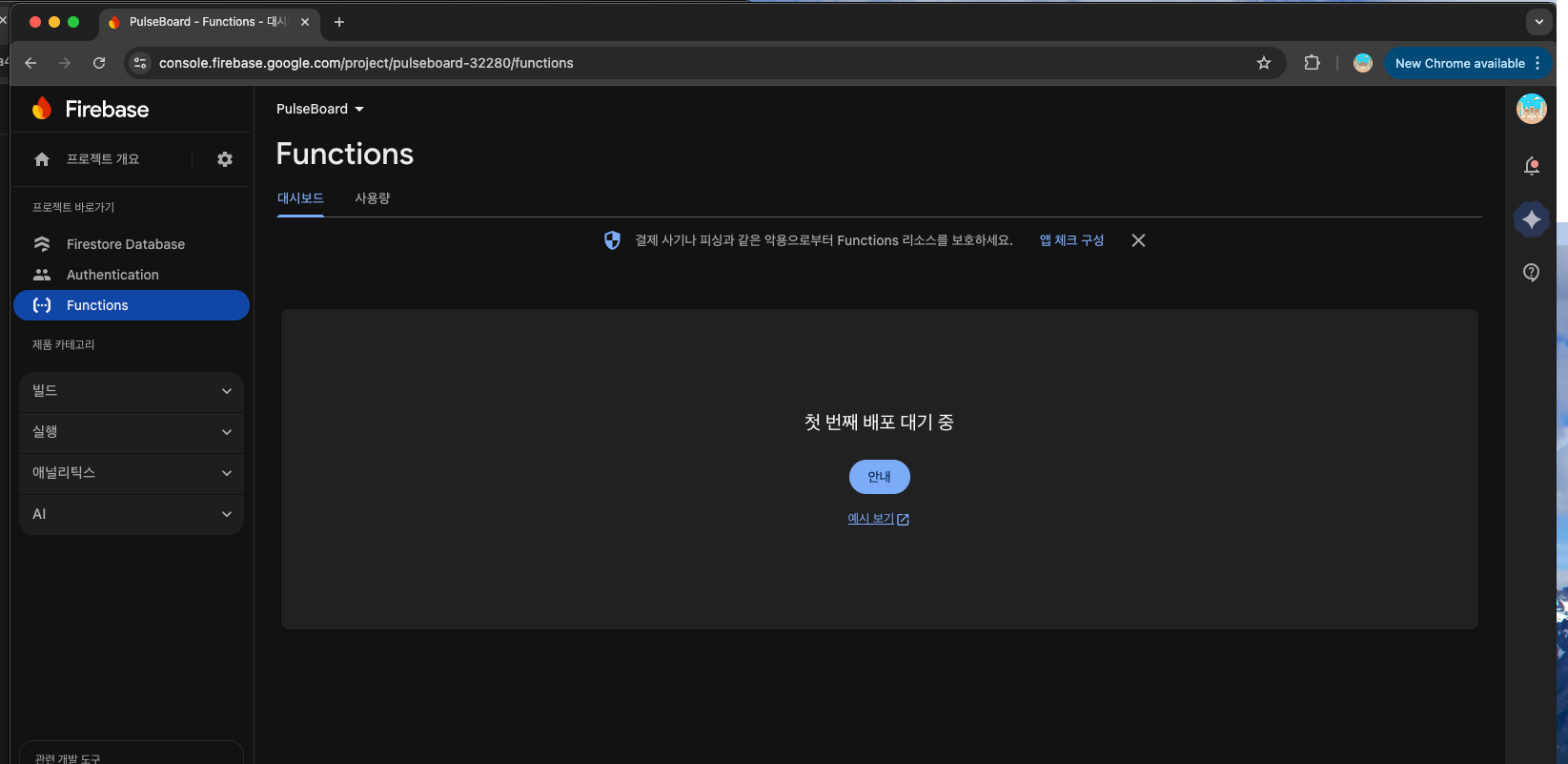
왜 콘솔에 아무것도 안 보이냐면?
지금 화면에 보이는 문구가 핵심이야 👇
“첫 번째 배포 대기 중”
이 말의 실제 의미는:
- Functions 인프라 생성은 끝났고
- 배포도 성공했지만
- 콘솔 UI가 함수 메타데이터를 아직 동기화 못한 상태
즉,
ukar:
배포 성공 (CLI) ✅
↓
백엔드 리소스 생성 중
↓
콘솔 UI 반영 대기 중 (지금)
✅ 이게 진짜 성공이라는 증거 (CLI 로그 기준)
로그 다시 보면 👇
✔ Deploy complete!
이 문구가 나왔다는 건:
- 함수 빌드 성공
- 함수 업로드 성공
- 함수 활성화 성공
👉 실패였으면 절대 이 문구 안 나옴
🔥 지금 당장 URL 확인하는 가장 확실한 방법 (콘솔 말고)
콘솔 UI 기다리지 말고, CLI로 바로 확인하자.
방법 1️⃣ functions 목록 조회 (추천)
firebase functions:list정상이라면 이런 출력이 나와야 해 👇
┌──────────────────┬───────────────┬───────────┬────────┬────────────┐
│ Function Name    │ Region        │ Trigger   │ Status │ Runtime    │
├──────────────────┼───────────────┼───────────┼────────┼────────────┤
│ kakaoCustomToken │ us-central1   │ https     │ ACTIVE │ nodejs22   │
└──────────────────┴───────────────┴───────────┴────────┴────────────┘
▶️ 출력결과
kwonjeong-geun@gwonjeong-geuns-MacBook-Air PulseBoard % firebase functions:list

┌──────────┬─────────┬─────────┬──────────┬────────┬─────────┐
│ Function │ Version │ Trigger │ Location │ Memory │ Runtime │
└──────────┴─────────┴─────────┴──────────┴────────┴─────────┘

   ╭────────────────────────────────────────────────────────────────────╮
   │                                                                    │
   │                 Update available 13.35.1 → 15.1.0                  │
   │           To update to the latest version using npm, run           │
   │                   npm install -g firebase-tools                    │
   │   For other CLI management options, visit the CLI documentation    │
   │         (https://firebase.google.com/docs/cli#update-cli)          │
   │                                                                    │
   │                                                                    │
   │                                                                    │
   ╰────────────────────────────────────────────────────────────────────╯
결론부터 말하면 👇
❌ 함수가 없는 게 아니라
⭕️ Firebase CLI 버전이 너무 낮아서 “Gen 2 Functions(Node 22)”를 못 보고 있는 상태야.
💥 원인 정리 (핵심)
1️⃣ Functions는 Gen 2 Functions
- Node.js 22
- Firebase Functions v2 런타임
- Cloud Run 기반
2️⃣ 그런데 네 Firebase CLI는 구버전
- CLI 13.x 계열
- Gen 2 Functions를 제대로 인식/표시 못 함
- 그래서:
- deploy는 성공
- functions:list / 콘솔 UI는 빈 것처럼 보임
👉 CLI와 콘솔이 “못 알아보는” 상태지, 함수가 없는 게 아님
- firebase deploy --only functions → Deploy complete!
- 에러 ❌
- Cloud Build / Artifact Registry 자동 활성화됨
- Node 22 사용 중
👉 이 조합은 Gen 2 Functions 배포 성공 패턴이야.
✅ 해결 방법 (반드시 해야 함)
🔥 Firebase CLI 업데이트
npm install -g firebase-tools@latestfirebase --version
🔁 업데이트 후 다시 확인
CLI 업데이트 끝나면 순서대로:
firebase functions:list정상이라면 이제 이렇게 나올 거야 👇
┌──────────────────┬─────────┬─────────┬────────────┬────────┬─────────┐
│ Function         │ Version │ Trigger │ Location   │ Memory │ Runtime │
├──────────────────┼─────────┼─────────┼────────────┼────────┼─────────┤
│ kakaoCustomToken │ v2      │ https   │ us-central1│ 256MB  │ nodejs22│
└──────────────────┴─────────┴─────────┴────────────┴────────┴─────────┘
그리고 Firebase Console에서도:
- Functions 목록이 보이기 시작함
- Trigger URL 확인 가능
kwonjeong-geun@gwonjeong-geuns-MacBook-Air PulseBoard % npm install -g firebase-tools@latest
npm warn EBADENGINE Unsupported engine {
npm warn EBADENGINE   package: 'firebase-tools@15.1.0',
npm warn EBADENGINE   required: { node: '>=20.0.0 || >=22.0.0 || >=24.0.0' },
npm warn EBADENGINE   current: { node: 'v18.20.8', npm: '10.8.2' }
npm warn EBADENGINE }
npm warn EBADENGINE Unsupported engine {
npm warn EBADENGINE   package: 'superstatic@10.0.0',
npm warn EBADENGINE   required: { node: '20 || 22 || 24' },
npm warn EBADENGINE   current: { node: 'v18.20.8', npm: '10.8.2' }
npm warn EBADENGINE }
npm warn deprecated node-domexception@1.0.0: Use your platform's native DOMException instead

added 124 packages, removed 31 packages, and changed 576 packages in 32s

86 packages are looking for funding
  run `npm fund` for details
kwonjeong-geun@gwonjeong-geuns-MacBook-Air PulseBoard % firebase --version
Firebase CLI v15.1.0 is incompatible with Node.js v18.20.8 Please upgrade Node.js to version >=20.0.0 || >=22.0.0 || >=24.0.0
kwonjeong-geun@gwonjeong-geuns-MacBook-Air PulseBoard % firebase functions:list
Firebase CLI v15.1.0 is incompatible with Node.js v18.20.8 Please upgrade Node.js to version >=20.0.0 || >=22.0.0 || >=24.0.0
✅ 지금 상황 요약 (아주 중요)
- Firebase CLI 업데이트는 성공 ✅
→ firebase-tools v15.1.0 설치됨 - 하지만 ❗️로컬 Node.js 버전이 낮아서 CLI를 실행 못 하는 상태 ❌
로그가 그걸 정확히 말해주고 있어 👇
Firebase CLI v15.1.0 is incompatible with Node.js v18.20.8
Please upgrade Node.js to version >=20.0.0 || >=22.0.0 || >=24.0.0
👉 즉,
CLI는 최신인데, 실행 엔진(Node.js)이 오래됨
🔥 왜 갑자기 Node.js 업데이트가 필요해졌나?
이유는 딱 하나야.
- 너의 Functions는 Gen 2 (Node 22) 로 배포됨
- 최신 Firebase CLI(v15)는:
- Gen 2 Functions
- Cloud Run 기반
- Node 22 런타임
을 전제로 동작
그래서:
- Node 18 ❌
- Node 20 이상 ⭕️
✅ 정답 루트 (강력 추천): nvm으로 Node 업그레이드
절대 Homebrew로 덮어쓰지 말고,
nvm(Node Version Manager) 로 가는 게 정석이야.
1️⃣ nvm 설치 (이미 있으면 스킵)
curl -o- https://raw.githubusercontent.com/nvm-sh/nvm/v0.39.7/install.sh | bash설치 후 터미널 완전히 종료 → 다시 열기
확인:
nvm --version
2️⃣ Node 22 설치
nvm install 22
설치 완료 후:
nvm use 22
확인:
node --version
# v22.x.x
3️⃣ Firebase CLI 다시 확인
firebase --version
# Firebase CLI v15.1.0
이제 에러 메시지 ❌ 없어야 정상.
4️⃣ Functions 목록 다시 확인
firebase functions:list┌──────────────────┬─────────┬─────────┬────────────┬────────┬─────────┐
│ Function │ Version │ Trigger │ Location │ Memory │ Runtime │
├──────────────────┼─────────┼─────────┼────────────┼────────┼─────────┤
│ kakaoCustomToken │ v2 │ https │ us-central1│ 256MB │ nodejs22│
└──────────────────┴─────────┴─────────┴────────────┴────────┴─────────┘
kwonjeong-geun@gwonjeong-geuns-MacBook-Air PulseBoard % node --version
v22.21.1
kwonjeong-geun@gwonjeong-geuns-MacBook-Air PulseBoard % firebase functions:list
zsh: command not found: firebase
kwonjeong-geun@gwonjeong-geuns-MacBook-Air PulseBoard % firebase --version
zsh: command not found: firebase
kwonjeong-geun@gwonjeong-geuns-MacBook-Air PulseBoard % firebase --version
zsh: command not found: firebase
🔥 결론부터
Node 22로 전환되면서,
이전 Node 18 환경에 설치돼 있던 firebase-tools가 PATH에서 사라진 것이다.
그래서 지금은:
- Node ✅ v22.21.1
- nvm ✅ 정상
- 하지만 ❌ firebase CLI가 Node 22 환경에는 설치되어 있지 않음
왜 이런 일이 생겼나? (핵심 원인)
1️⃣ nvm의 동작 방식
nvm은 Node 버전마다 완전히 분리된 환경을 만든다.
즉, 이 구조야:
Node 18 환경
 └─ npm global packages
     └─ firebase-tools (여기에 설치됨)

Node 22 환경
 └─ npm global packages
     └─ (아직 아무것도 없음)
그래서:
- Node 18 → firebase 명령어 있었음
- Node 22 → firebase 명령어 ❌ 없음
👉 완전히 정상
✅ 해결 방법 (정답 루트)
🔥 Node 22 환경에 firebase-tools 다시 설치하면 끝
지금 상태에서 그대로 실행 👇
npm install -g firebase-tools@latest
설치 후 반드시 확인
firebase --version
기대 결과:
Firebase CLI v15.1.0
그 다음 👇
firebase functions:list┌──────────────────┬─────────┬─────────┬────────────┬────────┬─────────┐
│ Function │ Version │ Trigger │ Location │ Memory │ Runtime │
├──────────────────┼─────────┼─────────┼────────────┼────────┼─────────┤
│ kakaoCustomToken │ v2 │ https │ us-central1│ 256MB │ nodejs22│
└──────────────────┴─────────┴─────────┴────────────┴────────┴─────────┘
❗ 절대 헷갈리지 말아야 할 포인트
- ❌ firebase CLI가 삭제됐다 → 아님
- ❌ PATH가 깨졌다 → 아님
- ❌ nvm 설정이 잘못됐다 → 아님
⭕️ Node 버전이 바뀌었기 때문에
해당 Node 버전에 CLI를 다시 설치해야 하는 것뿐
kwonjeong-geun@gwonjeong-geuns-MacBook-Air PulseBoard % npm install -g firebase-tools@latest

npm warn deprecated node-domexception@1.0.0: Use your platform's native DOMException instead

added 749 packages in 8s

92 packages are looking for funding
  run `npm fund` for details
kwonjeong-geun@gwonjeong-geuns-MacBook-Air PulseBoard % firebase --version
15.1.0
kwonjeong-geun@gwonjeong-geuns-MacBook-Air PulseBoard % firebase functions:list
No functions found in project pulseboard-32280.
kwonjeong-geun@gwonjeong-geuns-MacBook-Air PulseBoard % curl -X POST https://us-central1-pulseboard-32280.cloudfunctions.net/kakaoCustomToken \
  -H "Content-Type: application/json" \
  -d '{"kakaoAccessToken":"dummy"}'

<html><head>
<meta http-equiv="content-type" content="text/html;charset=utf-8">
<title>404 Page not found</title>
</head>
<body text=#000000 bgcolor=#ffffff>
<h1>Error: Page not found</h1>
<h2>The requested URL was not found on this server.</h2>
<h2></h2>
</body></html>
❌ 지금 상태의 정확한 원인
index.js는 Gen 1 방식으로 작성돼 있는데,
프로젝트는 Gen 2(Node 22)로 배포하려고 해서
실제로는 “아무 함수도 배포되지 않은 상태”다.
그래서 발생한 현상들이 전부 일관되게 설명돼:
- firebase deploy --only functions → “Deploy complete!”
- firebase functions:list → No functions found
- curl → 404 Page not found
👉 실제로는 배포할 “유효한 함수 정의”가 없었던 것
🔥 핵심 포인트 (제일 중요)
현재 코드 (문제 지점)
const functions = require("firebase-functions");

exports.kakaoCustomToken = functions.https.onRequest(...)
이건 Firebase Functions Gen 1 문법이야.
하지만:
- package.json
"engines": { "node": "22" }
- Firebase CLI v15
- Cloud Build / Artifact Registry 활성화
👉 이 프로젝트는 Gen 2 전용 환경
즉,
Gen 2 프로젝트에 Gen 1 함수 문법을 써서
Firebase가 “아, 배포할 함수가 없네?” 하고 넘어간 것
✅ 해결 방법은 하나뿐이다
/**
 * Firebase Cloud Functions (Gen 2)
 * Kakao Login → Firebase Custom Token 변환
 */

const { onRequest } = require("firebase-functions/v2/https");
const admin = require("firebase-admin");
const axios = require("axios");

// Firebase Admin SDK 초기화
admin.initializeApp();

/**
 * kakaoCustomToken
 * iOS에서 전달받은 Kakao accessToken을
 * Firebase Custom Token으로 변환하는 HTTP Function
 */
exports.kakaoCustomToken = onRequest(
  {
    region: "asia-northeast3", // ✅ 서울 리전
  },
  async (req, res) => {
    try {
      // 1️⃣ iOS 앱에서 전달한 Kakao accessToken 추출
      const { kakaoAccessToken } = req.body;

      if (!kakaoAccessToken) {
        return res.status(400).json({
          error: "Missing kakaoAccessToken",
        });
      }

      // 2️⃣ Kakao API 호출
      // accessToken을 Kakao 서버에 전달하여
      // 토큰 유효성 검증 + 사용자 정보 조회
      const kakaoResponse = await axios.get(
        "https://kapi.kakao.com/v2/user/me",
        {
          headers: {
            Authorization: `Bearer ${kakaoAccessToken}`,
          },
        }
      );

      // 3️⃣ Kakao 사용자 고유 ID 추출
      // Kakao 계정의 immutable identifier
      const kakaoUserId = kakaoResponse.data.id;

      if (!kakaoUserId) {
        return res.status(401).json({
          error: "Invalid Kakao token",
        });
      }

      // 4️⃣ Firebase에서 사용할 UID 생성
      // provider prefix를 붙여 충돌 방지
      // 예: kakao:123456789
      const uid = `kakao:${kakaoUserId}`;

      // 5️⃣ Firebase Admin SDK를 사용해 Custom Token 생성
      // 이 토큰은 Firebase가 신뢰하는 인증 토큰
      const customToken = await admin.auth().createCustomToken(uid, {
        provider: "KAKAO",
      });

      // 6️⃣ 생성된 Custom Token을 iOS 앱으로 반환
      // iOS에서는 signIn(withCustomToken:)으로 로그인
      return res.json({
        customToken,
      });
    } catch (error) {
      console.error("kakaoCustomToken error:", error);

      // 예외 발생 시 서버 에러 반환
      return res.status(500).json({
        error: "Internal Server Error",
      });
    }
  }
);
다음에 반드시 해야 할 작업
Region을 바꿨으니 재배포는 필수야.
firebase deploy --only functions
배포 로그에서 반드시 확인할 것:
✔ functions[kakaoCustomToken(asia-northeast3)]: Successful deploykwonjeong-geun@gwonjeong-geuns-MacBook-Air PulseBoard % firebase deploy --only functions
=== Deploying to 'pulseboard-32280'...
i deploying functions
i functions: preparing codebase default for deployment
i functions: ensuring required API cloudfunctions.googleapis.com is enabled...
i functions: ensuring required API cloudbuild.googleapis.com is enabled...
i artifactregistry: ensuring required API artifactregistry.googleapis.com is enabled...
✔ functions: required API cloudbuild.googleapis.com is enabled
✔ functions: required API cloudfunctions.googleapis.com is enabled
✔ artifactregistry: required API artifactregistry.googleapis.com is enabled
⚠ functions: package.json indicates an outdated version of firebase-functions. Please upgrade using npm install --save firebase-functions@latest in your functions directory.
⚠ functions: Please note that there will be breaking changes when you upgrade.
i functions: Loading and analyzing source code for codebase default to determine what to deploy
Serving at port 8904
i extensions: ensuring required API firebaseextensions.googleapis.com is enabled...
✔ extensions: required API firebaseextensions.googleapis.com is enabled
i functions: preparing functions directory for uploading...
i functions: packaged /Users/kwonjeong-geun/Desktop/Project/PulseBoard/functions (69.95 KB) for uploading
i functions: ensuring required API run.googleapis.com is enabled...
i functions: ensuring required API eventarc.googleapis.com is enabled...
i functions: ensuring required API pubsub.googleapis.com is enabled...
i functions: ensuring required API storage.googleapis.com is enabled...
✔ functions: required API run.googleapis.com is enabled
✔ functions: required API pubsub.googleapis.com is enabled
✔ functions: required API storage.googleapis.com is enabled
⚠ functions: missing required API eventarc.googleapis.com. Enabling now...
i functions: generating the service identity for pubsub.googleapis.com...
i functions: generating the service identity for eventarc.googleapis.com...
✔ functions: functions source uploaded successfully
i functions: creating Node.js 22 (2nd Gen) function kakaoCustomToken(asia-northeast3)...
✔  functions[kakaoCustomToken(asia-northeast3)] Successful create operation.
Function URL (kakaoCustomToken(asia-northeast3)):
https://asia-northeast3-pulseboard-32280.cloudfunctions.net/kakaoCustomToken
⚠ functions: No cleanup policy detected for repositories in asia-northeast3. This may result in a small monthly bill as container images accumulate over time.
✔ How many days do you want to keep container images before they're deleted? 14
i functions: Configuring cleanup policy for repository in asia-northeast3. Images older than 14 days will be automatically deleted.
i functions: Configured cleanup policy for repository in asia-northeast3.
✔ Deploy complete!
Project Console: https://console.firebase.google.com/project/pulseboard-32280/overview
✅ 먼저 전체 결과 한 줄 요약
카카오 Custom Token용 Gen 2 Firebase Function이
서울 리전(asia-northeast3)에 정상적으로 생성되었고,
실제 사용 가능한 URL까지 발급된 상태다.
이 줄이 그 증거야 👇
✔ functions[kakaoCustomToken(asia-northeast3)] Successful create operation.
Function URL (kakaoCustomToken(asia-northeast3)):
https://asia-northeast3-pulseboard-32280.cloudfunctions.net/kakaoCustomToken
👉 이 URL이 이제 iOS에서 호출할 진짜 엔드포인트다.
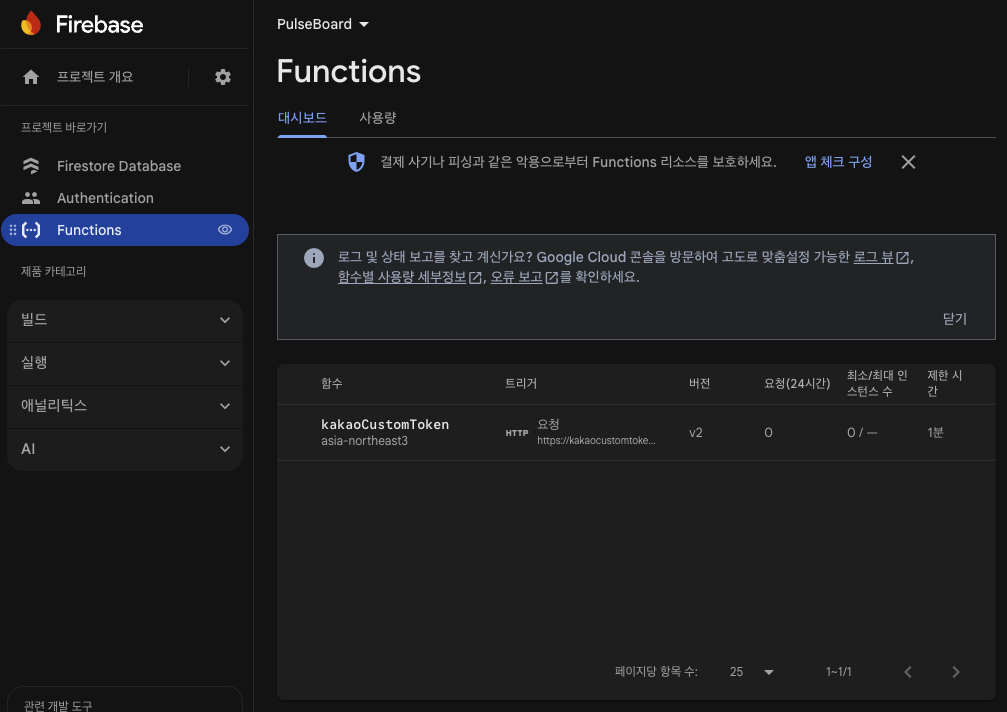
✅ 지금 이 화면이 의미하는 것
이미지에 보이는 핵심 포인트를 정리해보면 👇
- 함수 이름: kakaoCustomToken
- 트리거: HTTP
- 리전: asia-northeast3 (서울) ✅
- 버전: v2 (Gen 2 Functions) ✅
- 상태: 정상 배포됨
👉 이 말은 곧:
Firebase가 “이 함수는 실제로 존재하고,
외부에서 HTTPS로 호출 가능하다”고 공식적으로 인정한 상태
🔗 이제 사용할 “진짜 URL”
이미 콘솔에도 보이겠지만, 우리가 사용할 URL은 이거야 👇
https://asia-northeast3-pulseboard-32280.cloudfunctions.net/kakaoCustomToken
이 URL은 이제:
- curl 호출 가능
- iOS에서 호출 가능
- 실제 서비스에서 사용 가능
'PulseBoard' 카테고리의 다른 글
| 🤔 카카오, 네이버 로그인 - accessToken 처리 방향 (1) | 2025.12.26 |
|---|---|
| KakaoAuthHandler는 “무엇을 기준으로 설계했나?” (0) | 2025.12.26 |
| 🚀 axios 설치와 역할 - 서버에서 토큰 검증이 필요한 이유! (0) | 2025.12.26 |
| Firebase Cloud Functions index.js 완전 해설 (0) | 2025.12.25 |
| Firebase Authentication의 OpenID Connect를 쓰지 않고Cloud Functions + Custom Token으로 Kakao 로그인을 구현한 이유 (1) | 2025.12.25 |