✅ iCloud 연동해보기 (이미지.. 너 진짜..)
1. iCloud Capability 활성화하기
가장 먼저, 앱이 iCloud를 사용할 수 있도록 권한(Capability)을 활성화해야 합니다.
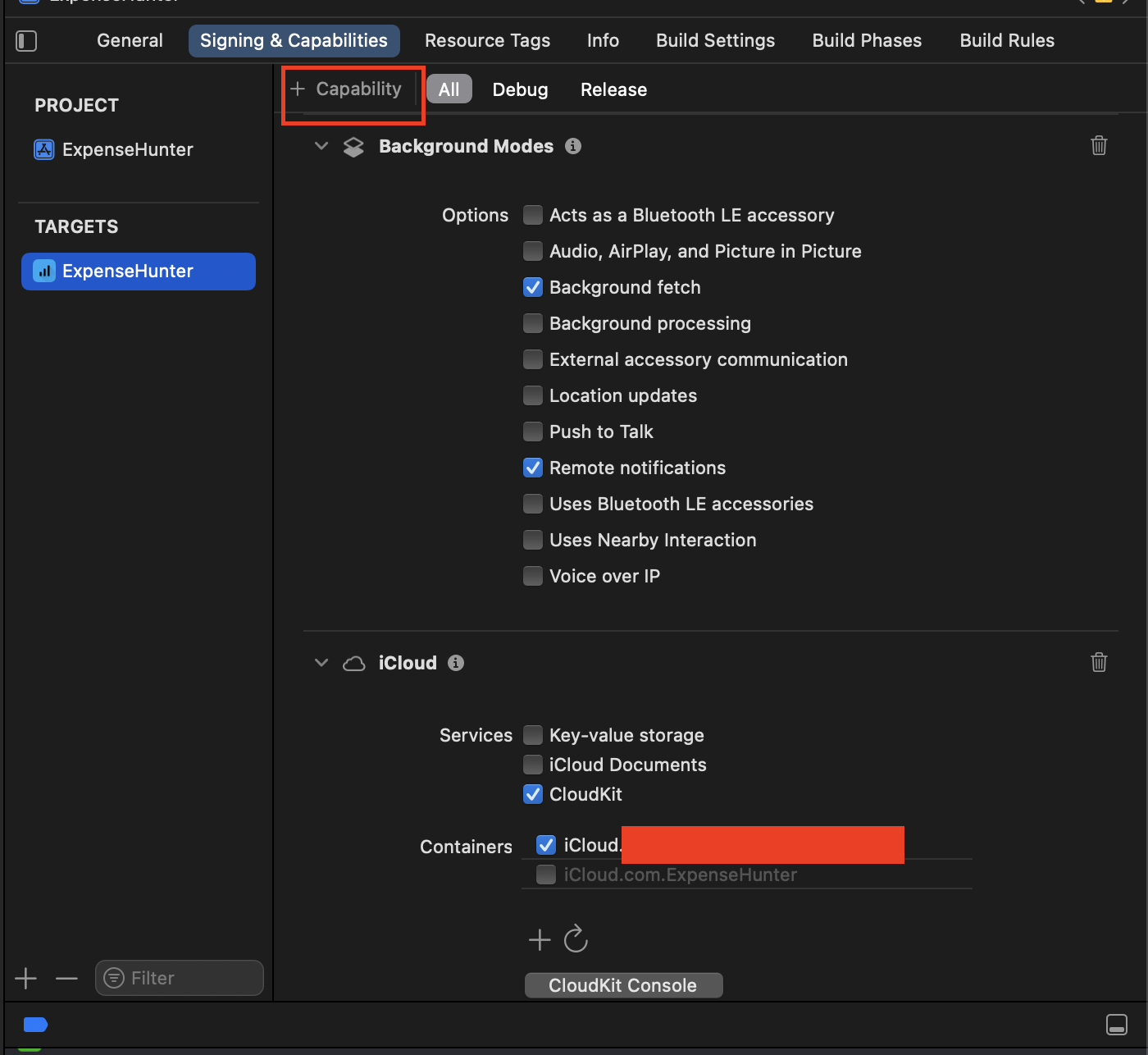
- Xcode에서 프로젝트를 선택하고, Signing & Capabilities 탭으로 이동하세요.
- 왼쪽 상단의 + Capability 버튼을 클릭하세요.
- 목록에서 iCloud와 Background Modes를 찾아 더블 클릭하거나, 우측으로 드래그하여 추가합니다.
- iCloud 섹션에서 CloudKit을 선택하세요.
- Container 섹션에서 Add Container를 클릭하고, iCloud.your-bundle-id 형식으로 컨테이너를 생성합니다.
2. Core Data Entity 설정
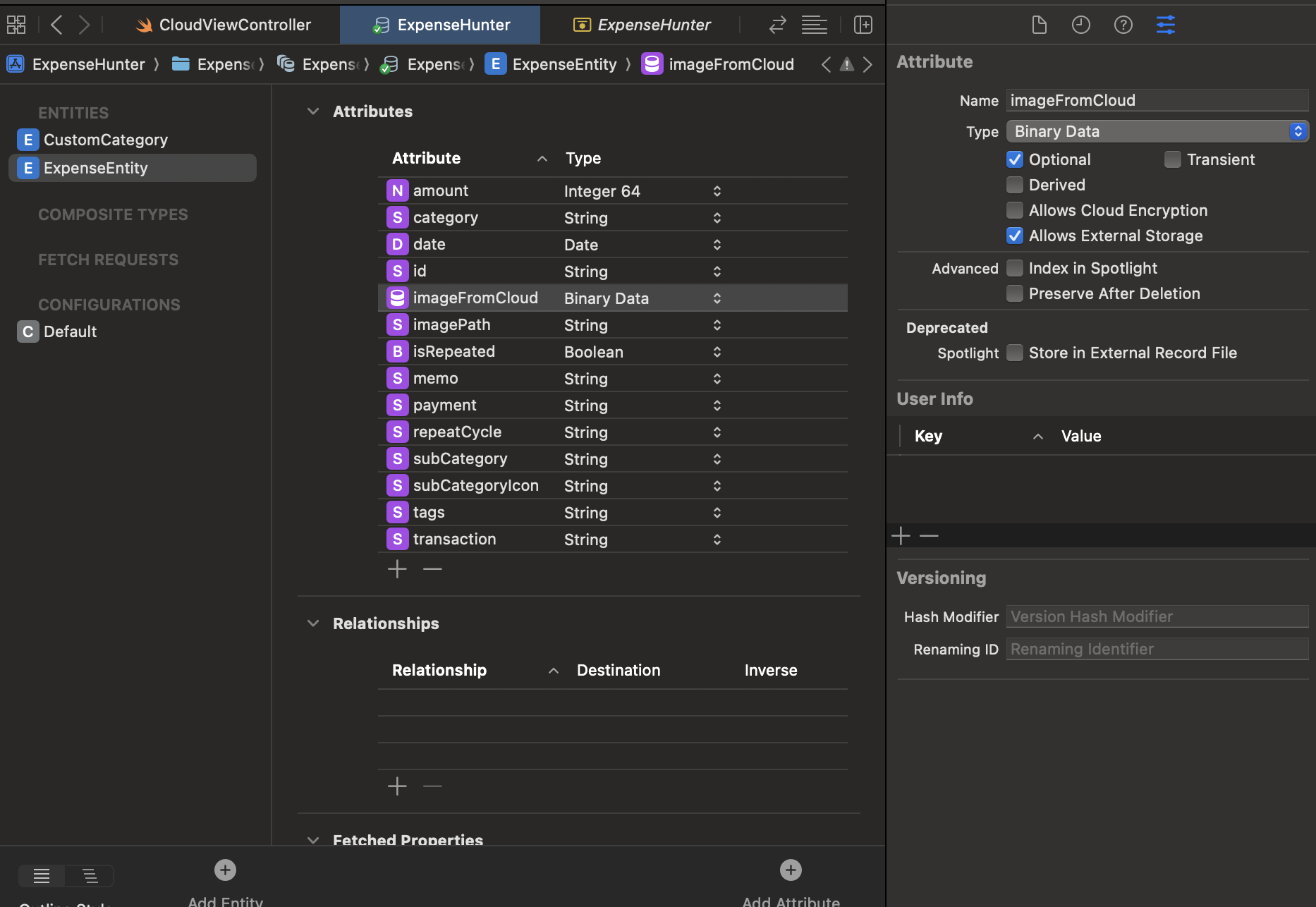
이미지를 저장하는데 많은 애를 먹었습니다.
기존에 사용하는 imagePath 라는 Attribute가 있었습니다. imagePath에는 사용자가 선택한 이미지를 파일 매니저를 저장하고, 저장된 경로를 반환해서 imagePath에 이미지 경로를 저장하고 있습니다.
여기에 새롭게 imageFromCloud를 생성했습니다. imageFromCloud는 사용자가 선택한 이미지를 iCloud와 연동할 목적과 기존 앱을 사용하던 사용자와 연동을 할 목적으로 별도로 생성했습니다.
추가로 "Allows External Storage"를 설정하여 iCloud에 연동할 수 있도록 했습니다.
3. ExpenseEntity+CoreDataProperties 설정
extension ExpenseEntity {

    @nonobjc public class func fetchRequest() -> NSFetchRequest<ExpenseEntity> {
        return NSFetchRequest<ExpenseEntity>(entityName: "ExpenseEntity")
    }

    @NSManaged public var id: String?
    @NSManaged public var transaction: String?
    @NSManaged public var amount: Int64
    @NSManaged public var date: Date?
    @NSManaged public var imagePath: String?
    @NSManaged public var category: String?

    @NSManaged public var subCategory: String?
    @NSManaged public var subCategoryIcon: String?
    @NSManaged public var payment: String?
    @NSManaged public var tags: String?

    @NSManaged public var memo: String?
    @NSManaged public var isRepeated: Bool
    @NSManaged public var repeatCycle: String?

    // ✅ iCloud에 이미지를 전달하기 위함
    @NSManaged public var imageFromCloud: Data?

}
extension ExpenseEntity {

    // 비동기 함수로 변경하여 이미지 로딩이 완료될 때까지 기다릴 수 있습니다.
    func toModel() async -> ExpenseModel? {
        guard
            let idString = self.id,
            let uuid = UUID(uuidString: idString),
            let transactionRaw = self.transaction,
            let transaction = TransactionType(rawValue: transactionRaw),
            let category = self.category,
            let subCategory = self.subCategory,
            let subCategoryIcon = self.subCategoryIcon,
            let payment = self.payment,
            let tags = self.tags,
            let date = self.date,
            let memo = self.memo
        else {
#if DEBUG
            print("❌ toModel 변환 실패: 필수 값 누락")
#endif
            return nil
        }

        // ✅ 로컬 이미지
        var localImage: UIImage?
        if let imagePath = self.imagePath, !imagePath.isEmpty {
            localImage = TransactionFileManager.shared.loadImage(from: imagePath)
        } else {
            localImage = nil
        }

        // ✅ iCloud 이미지
        var cloudImage: UIImage?
        if let data = self.imageFromCloud {
            print("Data size: \(data.count) bytes")
            cloudImage = UIImage(data: data)
        } else {
            print("UIImage 변환 실패")
            cloudImage = nil
        }

        let isRepeatedValue = self.isRepeated
        let repeatCycleEnum = RepeatCycle(rawValue: self.repeatCycle ?? "") ?? .none

        return ExpenseModel(
            id: uuid,
            transaction: transaction,
            category: category,
            subCategory: subCategory,
            subCategoryIcon: subCategoryIcon,
            payment: payment,
            amount: Int(self.amount),
            image: localImage,
            imageFromCloud: cloudImage,
            date: date,
            memo: memo,
            tags: tags,
            isRepeated: isRepeatedValue,
            repeatCycle: repeatCycleEnum
        )
    }
}
4. 내역 모델 개선
imageFromCloud 프로퍼티 추가했습니다.
class ExpenseModel {
    let id: UUID
    var transaction: TransactionType
    var category: String
    var subCategory: String
    var subCategoryIcon: String
    var payment: String
    var amount: Int

    var image: UIImage?
    var imageFromCloud: UIImage?   // ✅ iCloud 이미지 속성

    var date: Date
    var memo: String?
    var tags: String?

    // 반복 기능 설정
    var isRepeated: Bool?
    var repeatCycle: RepeatCycle?

    init(id: UUID = UUID(),
         transaction: TransactionType,
         category: String,
         subCategory: String,
         subCategoryIcon: String,
         payment: String,
         amount: Int,
         image: UIImage? = nil,
         imageFromCloud: UIImage? = nil,
         date: Date = Date(),
         memo: String? = nil,
         tags: String,
         isRepeated: Bool = false,
         repeatCycle: RepeatCycle? = nil
    ) {

        self.id = id
        self.transaction = transaction
        self.category = category
        self.subCategory = subCategory
        self.subCategoryIcon = subCategoryIcon
        self.payment = payment
        self.amount = amount
        self.image = image
        self.imageFromCloud = imageFromCloud
        self.date = date
        self.memo = memo
        self.tags = tags
        self.isRepeated = isRepeated
        self.repeatCycle = repeatCycle

    }
}
5. 코어 데이터 저장 및 업데이트 메서드 개선
사용자가 iCloud 연동 유무에 따라서 이미지 저장 로직을 구분해야 합니다.
iCloud 연동과 관련 없이 파읾 매니저를 통해 이미지를 저장하는 로직은 기본값으로 가져가고, iCloud가 연동될 경우에 imageFromcloud 에 Data 추가할 수 있도록 했습니다.
✅ Task { } 부분을 보면 비동기 처리를 했습니다. 이유는 간단합니다. 이미지를 iCloud에 연동하는 과정에서 데이터 처리 과정에 시간이 걸리기 때문입니다.
func createTransaction(_ transaction: ExpenseModel) -> AnyPublisher<ExpenseModel, Error> {
        return Future { [weak self] promise in
            guard let self = self else { return }

            let expenseEntity = ExpenseEntity(context: self.context)
            expenseEntity.id = transaction.id.uuidString
            expenseEntity.amount = Int64(transaction.amount)
            expenseEntity.date = transaction.date
            expenseEntity.category = transaction.category
            expenseEntity.subCategory = transaction.subCategory
            expenseEntity.subCategoryIcon = transaction.subCategoryIcon
            expenseEntity.payment = transaction.payment
            expenseEntity.transaction = transaction.transaction.rawValue
            expenseEntity.memo = transaction.memo
            expenseEntity.tags = transaction.tags
            expenseEntity.isRepeated = transaction.isRepeated ?? false
            expenseEntity.repeatCycle = transaction.repeatCycle?.rawValue

            // ✅ 이미지 저장 공통 처리 (항상 FileSystem + imagePath 기록)
            if let selectedImage = transaction.image {
                if let savePath = self.storageManager.saveImage(selectedImage, transaction.id.uuidString) {
                    expenseEntity.imagePath = savePath
                } else {
                    promise(.failure(NSError(domain: "TransactionImageSaveError", code: 1)))
                    return
                }

                // ✅ iCloud 활성화된 경우에는 imageFromCloud 에 Data 추가 저장
                let isICloudSyncEnabled = UserDefaults.standard.bool(forKey: "isICloudSyncEnabled")
                if isICloudSyncEnabled {
                    expenseEntity.imageFromCloud = selectedImage.jpegData(compressionQuality: 0.8)
                } else {
                    expenseEntity.imageFromCloud = nil
                }
            } else {
                expenseEntity.imagePath = nil
                expenseEntity.imageFromCloud = nil
            }

            print("🧾 CoreDataManager: 저장할 Expense 정보 확인")
            print("   - ID: \(String(describing: expenseEntity.id))")
            print("   - 금액: \(expenseEntity.amount)")
            print("   - 날짜: \(String(describing: expenseEntity.date))")
            print("   - 카테고리: \(String(describing: expenseEntity.category))")
            print("   - 서브카테고리: \(String(describing: expenseEntity.subCategory))")
            print("   - 서브카테고리아이콘: \(String(describing: expenseEntity.subCategoryIcon))")
            print("   - 결제방식: \(String(describing: expenseEntity.payment))")
            print("   - 타입: \(String(describing: expenseEntity.transaction))")
            print("   - 메모: \(expenseEntity.memo ?? "없음")")
            print("   - 태그: \(expenseEntity.tags ?? "")")
            print("   - 이미지 경로: \(expenseEntity.imagePath ?? "이미지 없음")")
            //print("   - 이미지(클라우드) 경로: \(expenseEntity.imageFromCloud ?? "이미지 없음")")

            Task {
                do {
                    try self.context.save()
                    if let model =  await expenseEntity.toModel() {
                        promise(.success(model))
                    } else {
                        promise(.failure(NSError(domain: "ModelConversionError", code: 2)))
                    }
                } catch {
                    promise(.failure(error))
                }
            }

        }
        .eraseToAnyPublisher()
    }
func updateTransaction(_ updatedTransaction: ExpenseModel) -> AnyPublisher<ExpenseModel, Error> {
        return Future { [weak self] promise in
            guard let self = self else { return }

            let fetchRequest: NSFetchRequest<ExpenseEntity> = ExpenseEntity.fetchRequest()
            fetchRequest.predicate = NSPredicate(format: "id == %@", updatedTransaction.id.uuidString)
            fetchRequest.fetchLimit = 1

            do {
                guard let entity = try self.context.fetch(fetchRequest).first else {
                    promise(.failure(NSError(domain: "TransactionUpdateError", code: 404)))
                    return
                }

                // 기본 속성 업데이트
                entity.transaction = updatedTransaction.transaction.rawValue
                entity.amount = Int64(updatedTransaction.amount)
                entity.date = updatedTransaction.date
                entity.category = updatedTransaction.category
                entity.subCategory = updatedTransaction.subCategory
                entity.subCategoryIcon = updatedTransaction.subCategoryIcon
                entity.payment = updatedTransaction.payment
                entity.memo = updatedTransaction.memo
                entity.tags = updatedTransaction.tags
                entity.isRepeated = updatedTransaction.isRepeated ?? false
                entity.repeatCycle = updatedTransaction.repeatCycle?.rawValue

                if let newImage = updatedTransaction.image {
                    // ✅ 항상 FileSystem 저장 + imagePath 갱신
                    if let newPath = self.storageManager.saveImage(newImage, updatedTransaction.id.uuidString) {
                        entity.imagePath = newPath
                    } else {
                        promise(.failure(NSError(domain: "ImageSaveFailed", code: 500)))
                        return
                    }

                    // ✅ iCloud 켜져 있으면 Data 추가 저장
                    let isICloudSyncEnabled = UserDefaults.standard.bool(forKey: "isICloudSyncEnabled")
                    if isICloudSyncEnabled {
                        entity.imageFromCloud = newImage.jpegData(compressionQuality: 0.8)
                    } else {
                        entity.imageFromCloud = nil
                    }
                } else {
                    // 이미지 제거
                    if let oldPath = entity.imagePath, !oldPath.isEmpty {
                        self.storageManager.deleteFolder(for: oldPath)
                    }
                    entity.imagePath = nil
                    entity.imageFromCloud = nil
                }


                try self.context.save()
                promise(.success(updatedTransaction))

            } catch {
                promise(.failure(error))
            }
        }
        .eraseToAnyPublisher()
    }
6. MVVM 패턴을 사용하기 위해 ViewModel 파일 구현
여기서 중요하게 보면, setupRemoteChangeObserver() 이 메서드는 Cloud와 연동을 통해서 NotificationCenter를 통해서 감지하여 모든 트랜잭션을 읽기를 하려고 합니다.
추가로 mergeDuplicateCategories() 메서드 를 구현하였는데, 이는 iCloud 연동할 경우에 기존 카테고리와 중복되어 저장되는 것을 방지하는 메서드 입니다.
final class TransactionManager: ObservableObject {


    // MARK: - Central Data Store
    @Published private(set) var transactions: [ExpenseModel] = []


    // MARK: - Temperary Propoerties (반복 데이터)
    private var newTransactionsQueue: [ExpenseModel] = []


    // MARK: - Dependencies
    private let coreDataManager = TransactionCoreDataManager.shared
    private var cancellables: Set<AnyCancellable> = []


    // MARK: - Initialization
    init() {

        // 앱이 시작될 때 모든 거래 내역을 불러옴
        readAllTransactions()

        // iCloud 동기화 알림을 감지하는 리스너 설정
        setupRemoteChangeObserver()

    }


    // MARK: - Funtions
    // MARK: - iCloud Remote Change Observer
        private func setupRemoteChangeObserver() {
            NotificationCenter.default.publisher(for: .NSPersistentStoreRemoteChange)
                .sink { [weak self] _ in
                    guard let self = self else { return }

                    #if DEBUG
                    print("✅ iCloud 데이터 변경 감지")
                    #endif

                    CategoryCoreDataManager.shared.mergeDuplicateCategories()

                    // iCloud 변경이 감지되면 다시 모든 트랜잭션 읽기
                    self.fetchAllTransactions()
                }
                .store(in: &cancellables)
        }


        private func fetchAllTransactions() {
            coreDataManager.readAllTransaction()
                .receive(on: DispatchQueue.main)
                .sink { completion in
                    switch completion {
                    case .finished:
                        #if DEBUG
                        print("✅ readAllTransactions 완료")
                        #endif
                    case .failure(let error):
                        #if DEBUG
                        print("❌ readAllTransactions 실패: \(error.localizedDescription)")
                        #endif
                    }
                } receiveValue: { [weak self] transactions in
                    guard let self = self else { return }
                    self.transactions = transactions
                    #if DEBUG
                    print("✅ transactions 갱신 완료, 총 \(transactions.count)개")
                    #endif
                }
                .store(in: &cancellables)
        }

         func mergeDuplicateCategories() {
        // context.perform을 사용하여 스레드 안전하게 작업 수행
        context.perform { [weak self] in
            guard let self = self else { return }

            let fetchRequest: NSFetchRequest<CustomCategory> = CustomCategory.fetchRequest()

            do {
                let allCategories = try self.context.fetch(fetchRequest)

                // 중복을 확인하기 위한 딕셔너리
                var uniqueCategories: [String: CustomCategory] = [:]

                for category in allCategories {
                    let uniqueKey = "\(category.categoryName ?? "")-\(category.parentCategory?.uuid ?? "root")"

                    if let existingCategory = uniqueCategories[uniqueKey] {
                        // 중복된 카테고리가 이미 딕셔너리에 있는 경우
                        self.context.delete(category)

                        #if DEBUG
                        print("✅ 중복 카테고리 감지 및 삭제: \(category.categoryName ?? "")")
                        #endif

                    } else {
                        uniqueCategories[uniqueKey] = category
                    }
                }

                try self.context.save()
                print("✅ 중복 카테고리 병합 및 저장 완료")

            } catch {
                print("❌ 중복 카테고리 병합 실패: \(error.localizedDescription)")
                self.context.rollback()
            }
        }
    }
✅ mergeDuplicateCategories() 메서드
iCloud 동기화로 인해 발생하는 카테고리 중복 문제를 해결하기 위해 설계된 핵심 로직입니다.
Core Data와 CloudKit을 함께 사용할 때 발생하는 고질적인 문제(Unique Constraints 미지원)를 수동으로 해결하는 방식을 취하고 있으며, 각 코드 줄이 어떤 역할을 하는지 자세히 설명해 드릴게요.
context.perform { [weak self] in ... }
스레드 안전성 확보 (가장 중요): NSManagedObjectContext는 스레드 안전하지 않기 때문에, NSPersistentStoreRemoteChange 알림이 어떤 스레드에서 오든 상관없이, 이 클로저 내부의 모든 코드를 컨텍스트가 생성된 스레드에서 실행하도록 보장합니다.
이는 EXC_BAD_ACCESS와 같은 스레드 충돌 오류를 방지합니다.
var uniqueCategories: [String: CustomCategory] = [:]
중복 확인 딕셔너리: categoryName과 parentCategory를 조합한 고유 키(String)를 키로 사용하고, 실제 CustomCategory 객체를 값으로 저장할 딕셔너리를 초기화합니다. 이 딕셔너리가 "중복 검사 목록" 역할을 합니다.
let uniqueKey = "\(category.categoryName ?? "")-\(category.parentCategory?.uuid ?? "root")"
고유 키 생성: 현재 순회 중인 카테고리(category)의 이름을 가져오고, 부모 카테고리의 uuid를 가져와 -로 연결합니다.
부모 카테고리가 없는 최상위 카테고리일 경우 parentCategory?.uuid가 nil이므로, 이때는 "root"라는 문자열을 사용하여 키를 완성합니다.
이렇게 하면 '이름과 부모가 모두 같은' 카테고리만 동일한 키를 갖게 됩니다.
요약: 이 함수가 중복을 제거하는 방식
- 전체 스캔: 현재 저장소에 있는 모든 카테고리를 가져옵니다.
- 키 기반 식별: 카테고리 이름과 부모 카테고리 ID를 조합하여 카테고리를 고유하게 식별하는 키를 만듭니다.
- 첫 번째 객체 유지: 동일한 키를 가진 카테고리가 발견되면 (즉, 중복이라면) 나중에 발견된 객체를 context.delete()를 통해 삭제합니다.
- 반영: 삭제 작업을 일괄 처리한 후 context.save()로 최종 상태를 저장소에 반영합니다.
이 수동 병합(Manual Merge) 로직을 사용함으로써, Core Data의 제약을 우회하여 iCloud 환경에서도 데이터 중복을 효과적으로 관리할 수 있게 됩니다.
7. persistentContainer 분석
사용자의 설정에 따라 Core Data를 iCloud와 연동할지(CloudKit) 아니면 로컬로만 사용할지(일반 Core Data) 결정하는 매우 잘 설계된 로직입니다.
단순히 Core Data를 설정하는 것을 넘어, 사용자가 동기화 기능을 켜고 끌 수 있는 기능을 구현한 것이 핵심입니다.
일반적으로 AppDelegate.swift에 위치하며, 앱의 데이터 저장소(Persistent Store)를 초기화하는 역할을 합니다.
let isICloudSyncEnabled = UserDefaults.standard.bool(forKey: "isICloudSyncEnabled")

let container: NSPersistentContainer
- isICloudSyncEnabled: UserDefaults에서 "iCloud 동기화 활성화"라는 사용자 설정을 불러옵니다. 이 값이 true인지 false인지에 따라 이후의 NSPersistentContainer 설정이 완전히 달라집니다.
- container: 어떤 컨테이너를 사용할지 결정하기 위해 변수를 선언합니다.
아래 블록은 NSPersistentCloudKitContainer를 사용하여 데이터가 iCloud와 자동으로 동기화되도록 설정합니다.
if isICloudSyncEnabled {

    container = NSPersistentCloudKitContainer(name: "ExpenseHunter")

    guard let description = container.persistentStoreDescriptions.first else {
        fatalError("### no persistent store descriptions")
    }

    // ✅ 1. 컨테이너 ID를 올바른 형식으로 변경
    description.cloudKitContainerOptions = NSPersistentCloudKitContainerOptions(
        containerIdentifier: "iCloud.com.jungguen.ExpenseHunter" // 이 부분이 핵심
    )

    // ... 옵션 설정 ...

    // 컨텍스트 병합 및 자동 병합 설정
    container.viewContext.mergePolicy = NSMergeByPropertyObjectTrumpMergePolicy
    container.viewContext.automaticallyMergesChangesFromParent = true

}
- container = NSPersistentCloudKitContainer(name: "ExpenseHunter"): 일반적인 NSPersistentContainer 대신 CloudKit 통합 기능이 내장된 NSPersistentCloudKitContainer를 사용합니다.
- description.cloudKitContainerOptions = ...: CloudKit 연동을 위한 필수 설정입니다. 이 컨테이너가 어떤 iCloud 컨테이너 ID와 연결될지 지정합니다. (Xcode의 Capabilities 탭에서 설정된 ID와 일치해야 합니다.)
아래 설정들은 iCloud 동기화 시 데이터 변경 사항을 추적하고 처리하는 데 필수적이며, 데이터 모델이 변경될 때 앱이 다운되지 않도록 합니다.
// ✅ 2. 자동 마이그레이션 옵션 추가
description.shouldMigrateStoreAutomatically = true
description.shouldInferMappingModelAutomatically = true

description.setOption(true as NSObject, forKey: NSPersistentHistoryTrackingKey)
description.setOption(true as NSObject, forKey: NSPersistentStoreRemoteChangeNotificationPostOptionKey)
- shouldMigrateStoreAutomatically = true, shouldInferMappingModelAutomatically = true: 자동 마이그레이션을 활성화합니다. 데이터 모델을 변경했을 때(예: 엔티티에 새로운 속성 추가) 앱이 충돌하는 것을 방지하고 데이터를 자동으로 새 모델에 맞게 변환해 줍니다.
- NSPersistentHistoryTrackingKey: Core Data가 데이터 변경 이력(History)을 추적하도록 설정합니다. CloudKit 동기화의 기본이자 필수 요소입니다.
- NSPersistentStoreRemoteChangeNotificationPostOptionKey: iCloud에서 데이터 변경이 발생했을 때 NSPersistentStoreRemoteChange라는 알림을 앱에 보내도록 설정합니다. (우리가 TransactionManager에서 setupRemoteChangeObserver()를 통해 이 알림을 받아 카테고리 중복 제거 로직을 호출했었죠.)
} else {

    container = NSPersistentContainer(name: "ExpenseHunter") // 일반 컨테이너 사용

    // ... 마이그레이션 옵션 설정 ...

    description.setOption(true as NSObject, forKey: NSPersistentHistoryTrackingKey) // 히스토리 추적은 유지

    container.viewContext.mergePolicy = NSMergeByPropertyObjectTrumpMergePolicy
}
- container = NSPersistentContainer(...): CloudKit 기능이 없는 일반 Core Data 컨테이너를 사용하여 로컬 저장소만 관리합니다.
- 히스토리 추적 유지: 비록 iCloud 연동은 없지만, NSPersistentHistoryTrackingKey는 유지하는 것이 좋습니다. 나중에 다시 iCloud를 켤 때나, 데이터 변경 로직을 구현할 때 유용하기 때문입니다.
container.loadPersistentStores(completionHandler: { (storeDescription, error) in
    if let error = error as NSError? {
        fatalError("Unresolved error \(error), \(error.userInfo)")
    }
})


return container
- container.loadPersistentStores(...): 위에서 설정한 옵션들을 기반으로 데이터베이스 파일을 로드하고 컨테이너를 최종적으로 준비시킵니다.
- fatalError: 데이터베이스 로딩은 필수적인 단계이므로, 오류가 발생하면 앱을 강제 종료하고 개발자에게 오류 메시지를 보여줍니다.